Save a Chrome session, get it back anywhere
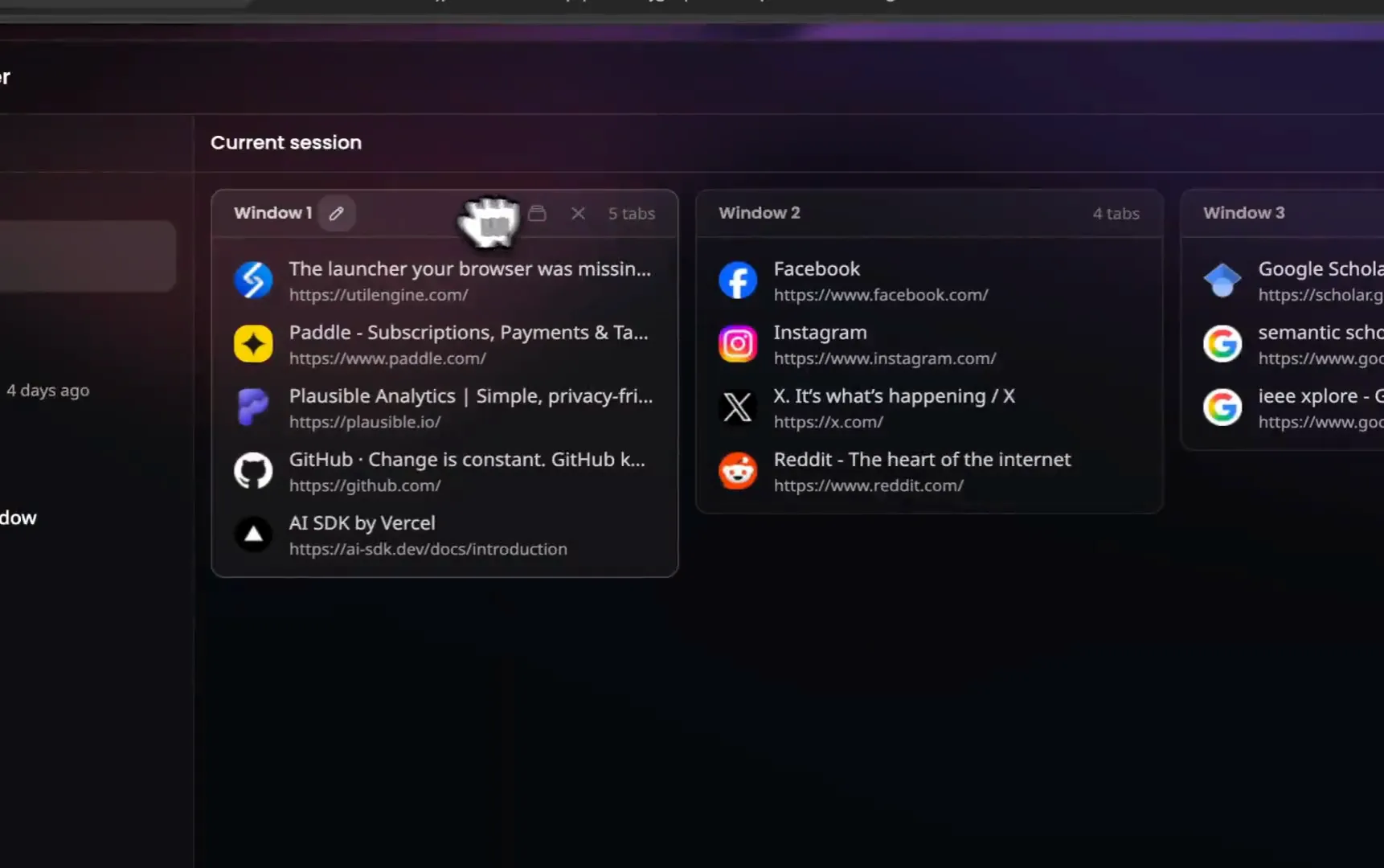
Save your open tabs as a session and restore the whole window later, here or on another machine. Snapshots run every hour on their own, and closing a window writes one last snapshot, so after a crash or a stray close your work is one command away.
Get it for $49 Figma - Q3 Redesign
 Competitor teardown
 Pricing research
 Analytics
 Launch checklist
How sessions work
Sessions you save on purpose, snapshots that happen on their own. Two layers between you and a lost window.
One command saves the whole window
Open the launcher, type “save”, and your open tabs are stored as a named session, in order. Save every window at once, just the one you are in, or only the tabs you tick. When you need them back, restore the session into a new window or the one you are in. Sessions sync with your account, so the tabs you saved at work open at home in the same order, pinned tabs included.
Two weeks of snapshots, hour by hour
Every hour by default, kept for 14 days, up to 500 snapshots. Open Window in the Session Manager brings back any single window from them.
Put tabs to sleep, free the memory
The Session Manager also shows your live windows. Put one tab to sleep, or every tab in a window at once, and the memory comes back while everything stays where it is. Sleeping tabs dim with a moon on the board and wake the moment you click them. It plays along with Chrome's own Memory Saver, and needs no extra permissions. More on tab sleep.
Find a tab you saved weeks ago
Type in the Session Manager and every tab across all your saved sessions and snapshots shows up in one list, each with where it came from. Pick one and the board opens with that tab highlighted. You never have to remember which session you put it in.

Open only the tabs you need
Tick the tabs you want on any saved session or snapshot and open just those, in a new window or the one you are in. Restore a whole session and every window comes back with the same tab in front.
Save tabs for later, then close them
Bookmark all tabs leaves you a folder of links. A session keeps the whole window, tab order and pinned tabs included, and syncs it to your account. Save it, close the window to free the memory, and open it again next week or on another computer. Snapshots cover the windows you forgot to save.
One launcher, sessions included
Everything lives behind one shortcut. It opens the launcher on any page, and your sessions are a keystroke away.
Most session managers are a separate app you have to visit. UtilEngine is a launcher for your browser, so saving and restoring sessions works like everything else. Press your shortcut, type a few letters, hit Enter, and a saved session is back. The same launcher runs 50+ commands, from a calculator to JSON tools to AI chat.
Page content and browsing history never reach our servers. You sign in once with Google or your purchase email, and we store your account details. Session contents sync through your account so your devices stay in step, and they are never shared with anyone.
How it compares
Already using a tab manager? Here is where UtilEngine differs on the thing that matters most, one line each.
 UtilEngine
- vs Session BuddyNow Local by default, paid sync rolling outWith UtilEngine Sessions sync, snapshots every hour
- vs WorkonaNow Workspaces on a subscriptionWith UtilEngine One payment, every feature
- vs TobyNow Tabs as cards on a boardWith UtilEngine Whole windows, tabs in order
- vs OneTabNow Free list on one machine, sync costs extraWith UtilEngine Synced sessions, hourly snapshots
- vs The Great SuspenderNow Removed in 2021, suspended tabs closedWith UtilEngine Native sleep, tabs keep their URL
Sessions, answered
How do I save a Chrome session?
Open the launcher with your shortcut, type save, and choose Save Session. Press Enter to keep every open tab and give the session a name. Enter saves all your windows in order, and Shift+Enter saves just the one you are in. It works the same in Chrome, Brave, and Edge.
How do I restore a Chrome session?
Open the launcher, type sessions, pick the one you want, and press Enter to open it in a new window, with the same tab in front as when you saved it. Shift+Enter opens it in the window you are in. Sessions sync with your account, so you can restore on another computer as well.
Are my tabs saved when I close Chrome?
Closing a window writes one last snapshot, and snapshots also run every hour while you browse. The tabs from a window you closed, or from a browser that crashed, wait in Manage Snapshots for 14 days. Saving a session is still the way to keep something for good.
How is this different from bookmarking all tabs?
Bookmark all tabs gives you a folder of links with no window, no order, and no pinned state. A session restores the window the way it was. Bookmarks are still the better choice for a single page you want to keep for years.
What happens if my browser crashes?
UtilEngine snapshots all your open windows on a schedule, every hour by default. After a crash, open the launcher and restore the latest snapshot.
How often do snapshots run?
Every hour by default. Change the interval in Settings and it follows you to your other browsers.
How long are snapshots kept?
14 days, up to 500 snapshots. Sessions you save yourself are kept until you delete them.
Do my sessions sync across computers?
Yes. Sessions follow your UtilEngine account. Save a window at work, restore it at home, in any Chromium browser.
Can I search for a tab without knowing which session it is in?
Yes. The Session Manager searches every tab across all saved sessions and snapshots at once, and opens the right board with the tab highlighted.
How big can a session be?
A session holds up to 25 windows, 250 tabs each.
Can I save only some of my tabs?
Yes. Save Session lists every open tab first. Press Enter to keep them all. To pick, press Cmd+Enter (Ctrl+Enter on Windows) on the first tab you want, Enter on the rest from any window, then Cmd+Enter again. Name the session and only those are saved.
Can UtilEngine put tabs to sleep?
Yes. Every live window in the Session Manager has a sleep action, per tab or for the whole window. A sleeping tab frees its memory but stays in place, and clicking it wakes it. Tabs suspended by Chrome's Memory Saver show as asleep too.
Do sleeping tabs lose anything?
The page reloads when it wakes, so unsaved form input may be lost. The tab itself, its address, and its spot in the window all stay. The active tab of a window never sleeps.
Does it save incognito windows?
Only if you want it to. Incognito windows stay out of snapshots and saved sessions until you switch on Save incognito windows in Settings. Your browser also has to allow UtilEngine in incognito.
Which browsers are supported?
Chrome, Brave, Edge, and other Chromium browsers. Firefox support is on the roadmap.
Stop losing windows
Sessions, snapshots, and 50+ commands.
Get it for $49One-time payment. 14-day refund, no questions asked.